How to test a SCORM package without an LMS
Updated
You can test most of what goes wrong with a SCORM package before it ever reaches an LMS. Check the zip and its manifest for the structural problems that make uploads fail, then run the course against a SCORM API that logs every call, and look for the handful of mistakes behind most "it won't track" complaints.
A SCORM package is a zip file with a manifest (imsmanifest.xml) that tells the LMS what to launch, plus the course files. When it runs, the course talks to the LMS through a JavaScript API: it initializes a session, reads and writes values such as completion status, score and bookmark, commits them, and terminates. Problems happen in two places: the package structure, which the LMS checks at upload, and that API conversation, which happens every time a learner opens the course.
Part 1: check the package before you upload
Most upload errors come from the zip, not the content. Unzip it and check:
- imsmanifest.xml sits at the root of the zip, not inside a folder. Zipping the folder instead of its contents is the most common cause of "no manifest found".
- The file name is exactly imsmanifest.xml, all lowercase. Some servers are case-sensitive.
- The manifest is well-formed XML. One unescaped ampersand in a course title breaks the whole file.
- It declares a SCORM version (1.2 or 2004) and the signals agree. A 1.2 schema with 2004 sequencing elements confuses LMSs.
- There is an <organizations> element with at least one <organization>, and each item points to a resource whose launch file exists in the zip at that exact path.
- It really is SCORM. cmi5, xAPI (Tin Can) and AICC packages look similar but need different LMS support.
- If the course should be passed by score, check the mastery score in the manifest and that the content actually reports a score.
Part 2: watch the API conversation
A package can upload cleanly and still never mark anyone complete. To see why, run the course against a SCORM API that records each call and look for these mistakes:
- Values set before Initialize (LMSInitialize in SCORM 1.2). The LMS ignores them, so the course thinks it saved progress that never arrived.
- No Terminate (LMSFinish) when the learner closes the course. Many LMSs only persist data on terminate or commit, so the last values are lost.
- Calls after Terminate, which are ignored.
- suspend_data over the limit. SCORM 1.2 only guarantees 4,096 characters; many LMSs truncate silently and the course cannot resume. SCORM 2004 4th edition raises the limit to 64,000.
- score.raw without score.min and score.max, so the LMS cannot work out a percentage. In SCORM 2004, also set score.scaled, which most LMSs use for pass/fail.
- success_status set to passed while completion_status stays unknown (SCORM 2004). Many LMSs will show the course as not completed.
- Calls to elements that do not exist in the declared version, such as cmi.core.lesson_status in a 2004 package. This usually means the authoring tool published for the other version.
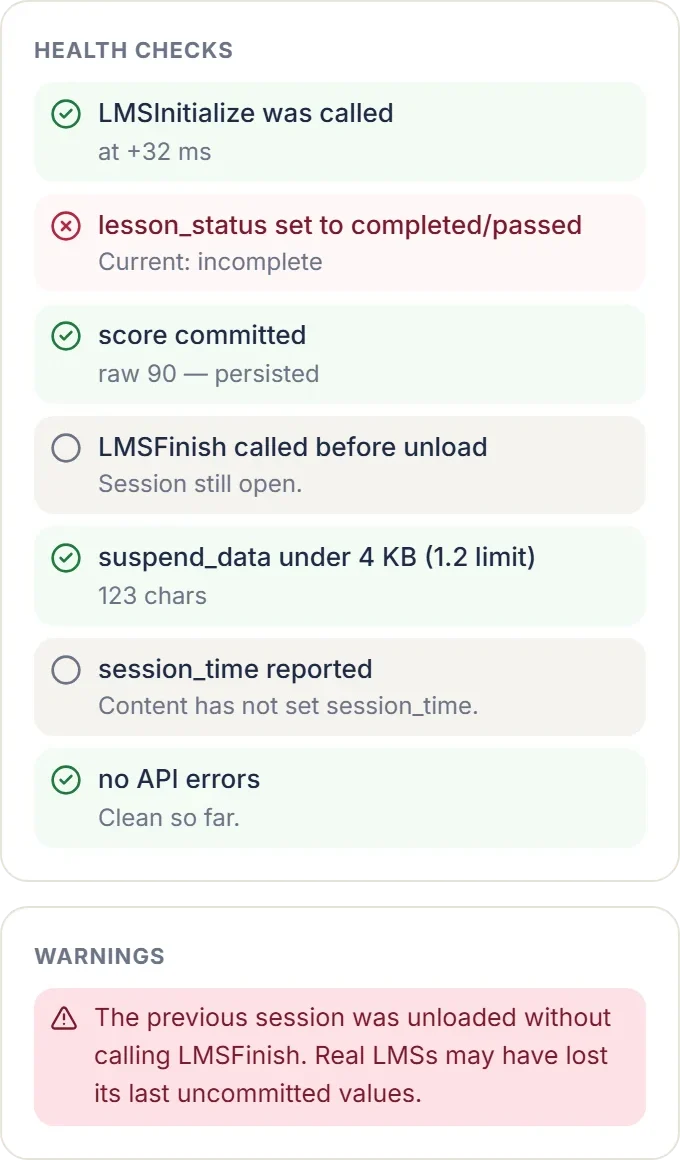
A test run, step by step
- Publish from your authoring tool and keep the zip as it is.
- Drop the zip into a SCORM tester and read the manifest report first. Fix any critical findings and republish before going further.
- Launch the course in the tester's sandbox and play it as a learner: answer some questions wrong, close it halfway, relaunch and check that it resumes.
- Finish it and confirm the log shows a completion (and a pass, if scored), a score with min and max, a commit, and a terminate.
- Download the API trace and keep it with the release. If the LMS later disagrees, the trace shows what the course actually sent.
SCORM Flight Recorder does all of this in your browser: it decodes the manifest, flags the structural problems above, then runs the course in a sandbox LMS and logs every call live, with warnings for the runtime mistakes. Nothing is uploaded. If you need to test LMS-specific behavior, such as how a particular platform handles sequencing rules, a hosted service like SCORM Cloud is the closer match; for finding out why a package will not upload or track, a local trace is usually faster.
When the package passes and the LMS still fails
If the trace looks right and the LMS still reports the course as incomplete, the cause is usually configuration: the course is set to complete on a different criterion than the content reports, the LMS expects a score the content never sends, or the package was uploaded as the wrong SCORM version. Send your LMS admin the trace; it turns a vague ticket into a specific one.